
Table of Contents
This summer, the industry has repeatedly been talking about the “AI glasses impossible triangle”: cost, performance, and battery life. Getting all three right at the same time is extremely difficult. And among these three challenges, heat is probably the most visible—and most frustrating—problem for users.
Media reports suggest that devices based on smartphone-class SoCs can reach 48–52°C around the temple area during sustained high-load operation, with temperatures above 43°C becoming noticeably uncomfortable for many users. That may explain why “taking the glasses off after half an hour and rubbing your temples” has become a familiar experience for some users.
But here is the more important point: How hot smart glasses feel is ultimately a structural design problem, not simply a chip problem.
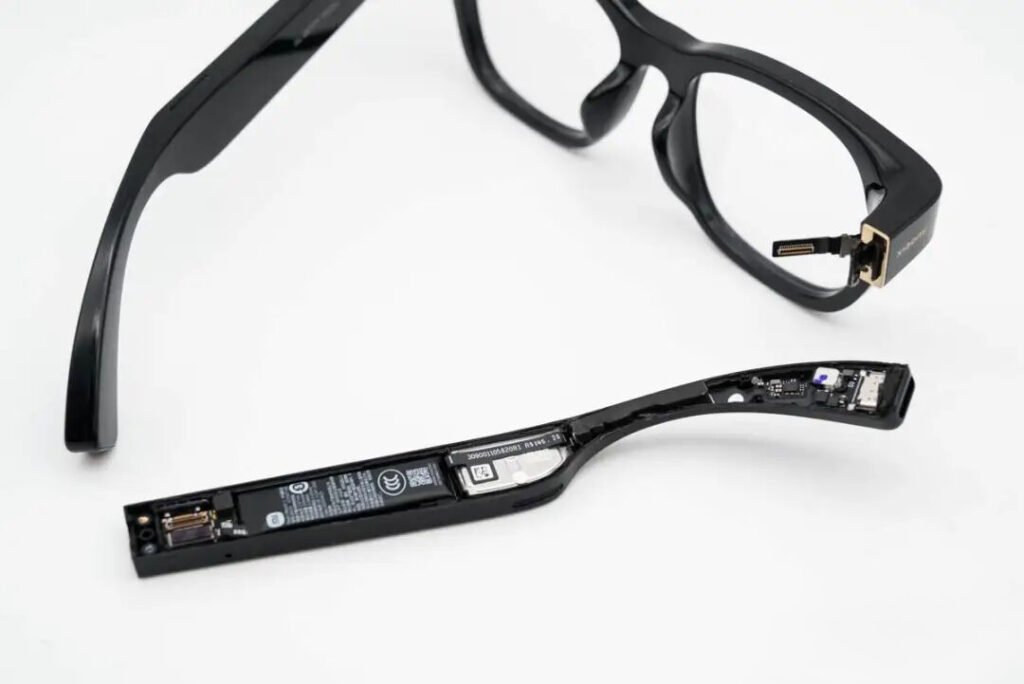
Inside a typical smart-glasses temple, the SoC, battery, speaker, antenna, and other components are all competing for the same tiny amount of space. In other words, thermal performance is largely determined by the mechanical and electrical architecture of the product long before a thermal solution is added.
Smart Glasses Heat Problem: Where Does It Come From?
Before discussing how to cool smart glasses, we first need to understand where the heat comes from. There are four major heat sources inside an AI-powered pair of glasses.
The main SoC: On-device AI inference is one of the biggest power consumers. The more computing performance you demand, the more power the processor needs to draw. This is where the “performance” side of the AI glasses impossible triangle begins to create thermal problems.
Blaming the chip alone misses the bigger picture. The processor is being pushed to run intensive workloads. If the thermal architecture cannot effectively remove that heat, the problem eventually shows up at the user’s skin.
The camera and ISP: Taking a single photo is not a major issue. Continuous image capture, video recording, image processing, and computer vision workloads are different. When the camera subsystem and ISP operate continuously, heat starts to accumulate.
The battery: High-current discharge generates heat inside the cell, and batteries are also highly sensitive to temperature. As temperature rises, battery aging can accelerate, which may force the system to operate more conservatively, creating a feedback loop between thermal limitations and performance.
Wireless connectivity: High-speed wireless communication—especially when transmitting large amounts of image or video data—also creates heat in the RF and connectivity subsystems
A smartphone may contain many of the same heat sources. So why does nobody have to take a smartphone off their face? Because the thermal environment inside smart glasses is much worse.
Why Smart Glasses Are Among the Hardest Consumer Electronics to Cool
First: They sit directly against the skin.
The temple area is highly sensitive to temperature. There is also a common misconception that a temperature number alone tells you how uncomfortable a device will feel. A smartphone back cover at 40°C may still be tolerable. But the user experience depends heavily on what material is touching the skin and how quickly heat is transferred.
Metal conducts heat efficiently. A metal surface at 42°C can feel significantly hotter than a plastic surface at the same temperature. That means the goal is not simply to reduce the peak internal temperature. The goal is to control where the heat travels and where it ultimately reaches the user.

Second: There is no room for active cooling.
A smartphone can spread heat over a relatively large body. Smart glasses cannot simply add a fan or create a large cooling chamber.
Almost everything has to rely on passive thermal management. Heat must travel from the source through the PCB, thermal interface materials, structural components, frame, and housing before it can be dissipated.
Third: Weight is already tightly constrained.
A complete pair of smart glasses may weigh only a few dozen grams. Every additional gram used for thermal structures is competing with the battery, speakers, sensors, optics, and mechanical components. This is why the idea of simply using a “full metal body” is not always practical.
Metal can provide excellent thermal conductivity, but smart glasses still need to satisfy weight, stiffness, manufacturability, antenna performance, and user comfort requirements. In a lightweight wearable, better thermal conductivity does not automatically mean better overall thermal design.
Effective Cooling Is Not Just About Adding Metal—It Starts With Designing the Thermal Path
This is where smart-glasses thermal management becomes interesting. The real challenge is not that engineers have no way to remove heat.
The problem is: There is simply very little space available for heat to go.
That is why modern thermal design is increasingly focused not only on finding materials with higher thermal conductivity, but first answering a more fundamental question:
Where should the heat go?
Publicly available patents and teardown information from smart-glasses manufacturers show several recurring approaches.
For example, thermal architecture disclosed in Snap-related patents describes separating the heat paths of different components. Heat generated by imaging components can be directed toward the front frame, while processor-related heat can be directed toward the temple area. Thermal isolation can also be used to prevent different heat sources from continuously heating one another.
The underlying principle is simple: Do not let every heat source turn the same tiny area into a thermal hotspot.
The first step in thermal design is therefore thermal zoning.
1. Keep Major Heat Sources From Fighting for the Same Space
The SoC is one of the most important continuous heat sources in an AI smart-glasses system. If the processor, wireless chipset, battery, and other power-hungry components are all concentrated in one small region, their thermal loads can accumulate rapidly. A better approach is to divide the heat sources into different zones and give each one a suitable thermal path:
High-heat component → dedicated thermal path → heat spreading → larger dissipation area
Some designs intentionally direct processor heat toward the rear section of the temple or other areas that are less thermally sensitive than the temple region closest to the user. The goal is not to make the heat disappear. It is to move the heat away from the places where the user is most likely to feel it.
2. Treat the Temple as a Thermal Highway
The temple is narrow, but it is one of the few relatively long structural areas available in a pair of smart glasses.
That makes it a potential thermal pathway.
Publicly disclosed thermal architectures have explored heat spreaders, vapor chambers, graphite materials, and metal carriers to move processor heat along the temple and distribute it over a larger area. Some designs even explore moving heat across the hinge area so that heat generated on one side can be transferred toward another region with better thermal dissipation characteristics.
This leads to one of the most important principles in smart-glasses thermal design: The key is not simply the thermal material. The key is the thermal path.
Even an excellent heat-conducting material cannot solve the problem if all the heat eventually ends up in the same skin-contact area.
3. Graphite, Copper Foil, and TIMs Help Spread Heat
In real products, thermal management usually relies on multiple materials working together. Teardown information from products such as Ray-Ban Meta indicates the use of thermal materials around processor-related areas to help transfer heat away from localized hotspots.
Similarly, teardown reports of XREAL Air 2 Pro have identified copper-based thermal spreading structures and thermal interface materials around relevant IC areas.
These components may appear small and insignificant, but their purpose is straightforward:
Turn one extremely hot point into a larger area with a lower temperature rise.
This process is known as thermal spreading. For smart glasses, where the usable thermal area may be only a few square centimeters, thermal spreading can be more valuable than simply adding a traditional heatsink.
The Battery Is Also Part of the Thermal Problem
When people talk about smart-glasses heat, they often focus on the SoC, but the battery also contributes to thermal load because resistive heating increases with current and internal resistance (I²R).
When AI glasses are simultaneously recording video, transmitting data, running AI inference, and driving audio output, the battery may need to deliver relatively high current for short periods of time.
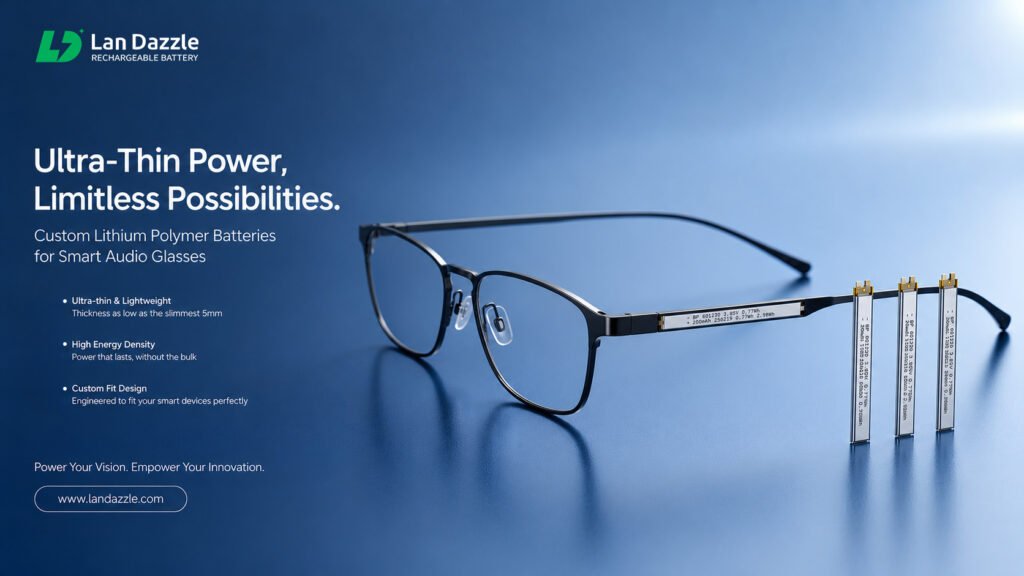
If internal resistance is high, more energy is dissipated as heat and voltage drop becomes more significant. That is why the same battery capacity does not necessarily mean the same thermal performance. For small, high-performance wearables, battery internal resistance, discharge capability, and voltage stability can all affect system-level thermal behavior.
Low Internal Resistance Is Not Just About High Power
The most obvious benefit of a low-resistance battery is better high-load performance.
Consider a sudden AI workload: Camera → ISP → AI Compute → Wireless Transmission → Audio Output
Several subsystems may become active almost simultaneously. The battery must respond quickly to the increased current demand. If the battery has high internal resistance, the voltage drop becomes larger and resistive heating increases.
From a system perspective:
Low internal resistance = lower battery-side heat generation + more stable voltage delivery
This is why battery selection for AI glasses should not be based on mAh alone. Engineers should look at: Capacity + C-rate + Internal Resistance + Thermal Performance
Why Stacked Cells Are Well Suited to Compact, High-Load Wearables
There is another fundamental problem with smart-glasses batteries: There is no room for a standard battery.
A temple is rarely a simple rectangular cavity. Space is shared with the SoC, speaker, camera, antenna, FPC, mechanical structures, and other components. The battery cannot simply be treated as “something that fits into the remaining space.”
In many wearable designs, the better approach is: Design the battery around the available internal space.
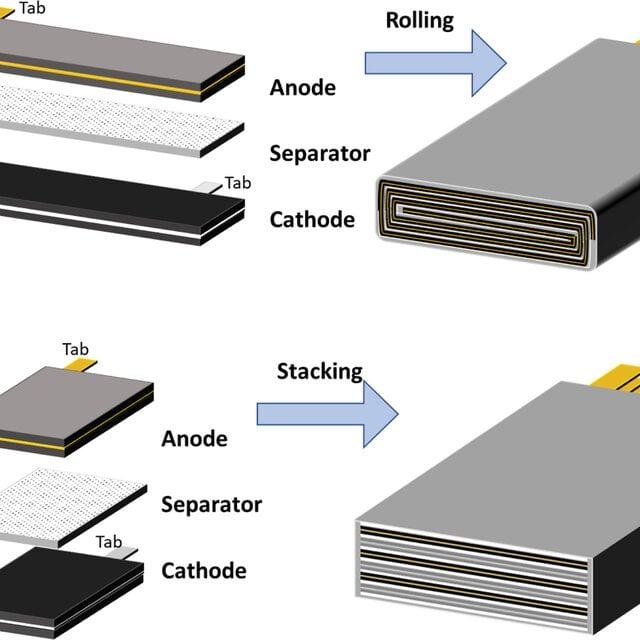
This is where custom battery design becomes particularly important. For example, a temple may contain a long, narrow cavity that cannot accommodate a conventional off-the-shelf cell. A custom battery can be designed around the available length, width, thickness, and sometimes irregular geometry, helping engineers recover space that would otherwise be wasted.
For smart glasses, an extra millimeter of usable length can become additional battery capacity. A fraction of a millimeter saved in thickness can determine whether all the components fit at all. This is also where stacked-cell technology can provide advantages.
Compared with conventional winding structures, stacked cells are built by layering individual electrode sheets, giving designers greater flexibility when optimizing the cell for custom dimensions and geometries.
The electrode structure can also support shorter current paths and low internal resistance, which is valuable for high-rate, high-transient applications. For smart glasses, the real objective is not simply to build a battery with the largest possible capacity.
It is to build a battery that fits in a very limited space, delivers stable power, and minimizes unnecessary internal heat under demanding workloads.
Smart-Glasses Thermal Management Is a System-Level Problem
Smart-glasses thermal management is not just a cooling problem. SoC power consumption, PCB layout, thermal pathways, structural materials, battery internal resistance, and battery placement all affect the final surface temperature.
That is why thermal management should be considered from the beginning of the product design, rather than added later as a fix. Once the structure, battery size, and temple layout are finalized, improving cooling often means adding weight, reducing battery capacity, or sacrificing performance. A better approach is to design the heat source, heat path, and battery location together from the start.
Conclusion
The next generation of AI glasses may compete on more than just processing power. The real challenge will be fitting high-performance computing, long battery life, and advanced features into a lighter, thinner, and cooler frame. Users care less about how many TOPS a processor delivers and more about whether the glasses stay comfortable during extended use, last through the day, and maintain stable performance under heavy workloads.
That makes thermal comfort an increasingly important design target alongside cost, performance, and battery life. Effective thermal management is not simply about reducing heat; it requires the SoC, battery, PCB, mechanical structure, and thermal pathways to work together as one system. In highly integrated AI glasses, the battery is therefore no longer just an energy-storage component—it is also part of the product’s thermal and mechanical architecture.
At LanDazzle, we develop custom battery solutions for smart glasses, wearables, and other space-constrained electronics. By combining custom dimensions, stacked-cell structures, and low-internal-resistance designs, we help engineers balance capacity, power delivery, space utilization, and thermal performance within demanding wearable form factors.
The right battery should not simply fit the product. It should be designed as part of the system.
Email: info@landazzle.com
Whatsapp: +8618938252128